Stock Register in Excel: 7 Problems and How to Fix Them
By NAMAH Digital Works
October 2026
7 min read
A stock register in Excel is where most small and mid-sized businesses begin. It works while there is one store, one person updating it and a few dozen items. As the business grows, the register starts to drift away from what is actually on the shelf, and nobody can say by how much.
Here are seven problems we see with Excel stock registers, a quick fix for each that you can try inside Excel, and the point at which a proper stock app makes more sense.
Seven problems with Excel stock registers
1. The balance is never quite right
Receipts and issues are entered at the end of the day, or the end of the week, or when someone remembers. So the balance in the sheet is a record of the past, not the stock on the shelf right now. Quick fix: enter every movement the same day, and keep receipts and issues as separate lines, never by overwriting the balance. In an app: the balance updates the moment a receipt or issue is saved, and the store can see what is available before it issues.
2. Multiple copies and versions
The store has one file, purchase has another, and the accounts team has an emailed copy from last month. Each one is slightly different. Quick fix: keep one master file in a shared location and ban copies. In an app: there is only one live record, and everyone works on it from a browser.
3. Units and names go wrong
The same item appears as "MS Plate 6mm", "M.S. plate 6 mm" and "ms plate 6mm". Quantities get mixed between kilograms, sheets and numbers. Totals no longer add up. Quick fix: one master item list, dropdowns through data validation, and a single unit per item. In an app: items are picked from a master list, with unit conversions handled for you, for example a sheet and its weight in kilograms.
4. Nobody knows who issued what
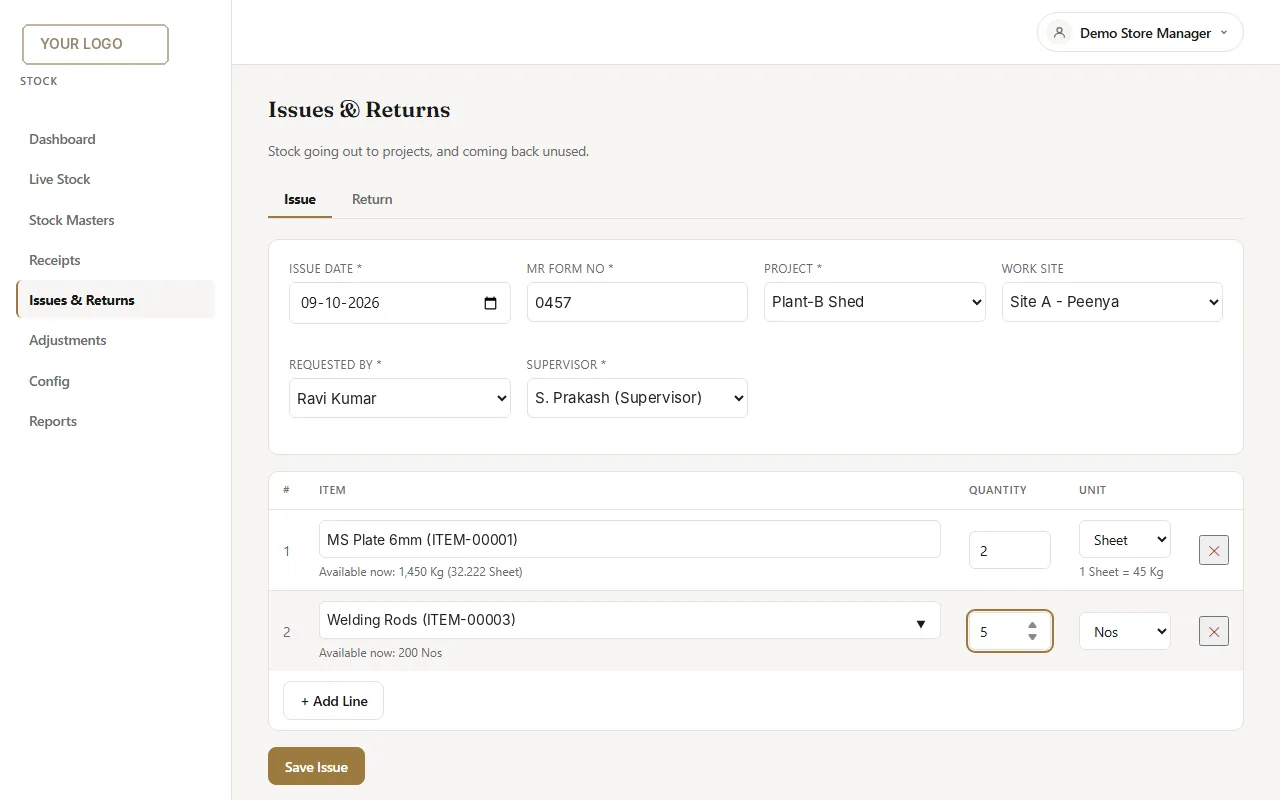
Material leaves the store against a paper request form, and the register records only the quantity. When a figure is questioned months later, there is no trace of the project, requester or supervisor. Quick fix: add columns for form number, project, requester and supervisor, and make them mandatory. In an app: an issue cannot be saved without those details, and they appear in reports.
An issue screen where the project, requester and supervisor are recorded with every issue. Shown with demo data.
5. Returns and adjustments go untracked
Unused material comes back from site, or a count shows a shortage, and the register is corrected quietly with a changed number. The history is lost, and so is the reason. Quick fix: record returns and adjustments as their own entries with a reason, never as an edit to the balance. In an app: returns require a reason, and adjustments are logged like any other movement.
6. Nobody can say what the stock is worth
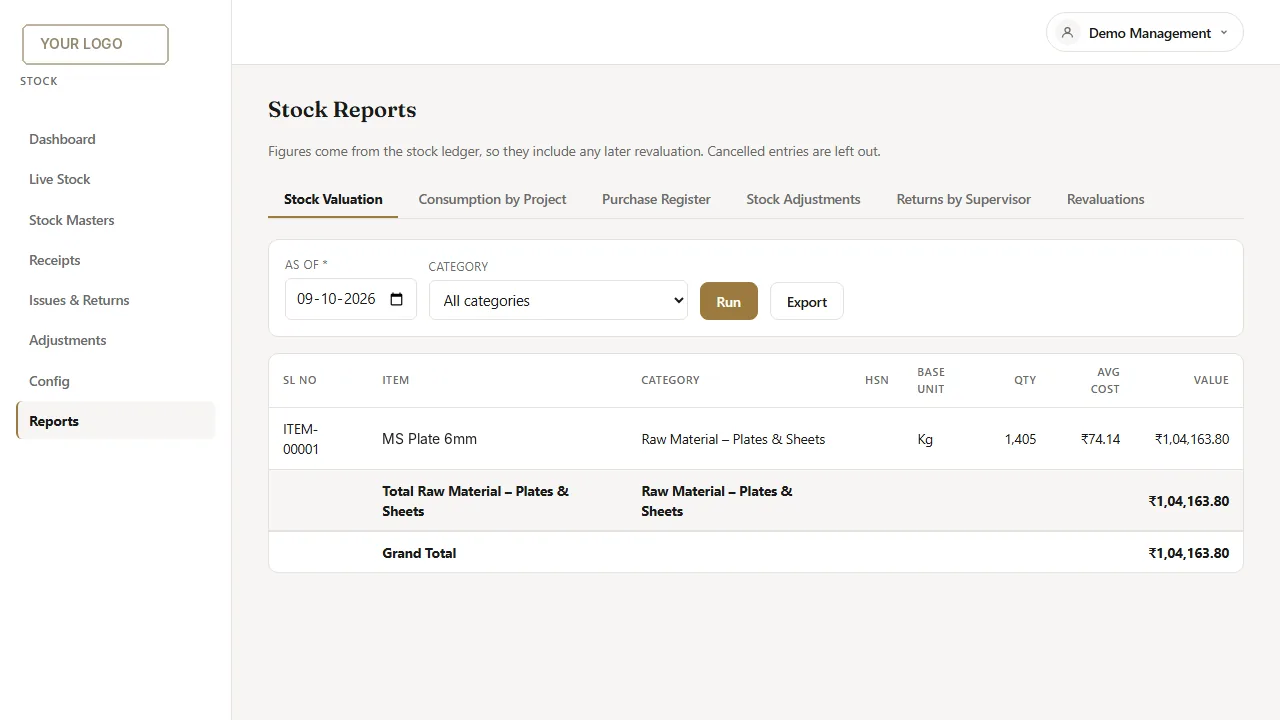
Quantity is one thing. Value is another, and owners and accountants need it. Working out the value of stock at weighted average cost across many purchases, as of a particular date, is slow and error-prone in a spreadsheet. Quick fix: keep purchase rate on every receipt line and calculate the average in one agreed way. In an app: stock value at weighted average cost is a report you can run for any date.
Stock value at weighted average cost, with consumption by project and purchase reports one tab away. Shown with demo data.
7. No warning before something runs out
A spreadsheet cannot tell you that a critical item is running low. You find out when a job stops. Quick fix: add a reorder level column and use conditional formatting to highlight items below it. In an app: low-stock alerts are built in.
How to tell it is time to move
You can fix a lot inside Excel with discipline and a few rules. The sign that Excel is no longer enough is when the rules need to be enforced by something other than people remembering them. If the store, purchase and accounts teams all need the same live numbers, if you need to see stock by project or site, or if the stock value is something you simply cannot get, it is time for a stock app.
Moving without losing your history
The usual worry is the data already in the sheets. It is normal for that data to be messy. A sensible migration maps what is there, cleans the item master, and brings in opening balances. Where there is no record at all, for example an untracked store, the simplest start is a physical count sheet to capture opening stock, after which the app keeps it right.
We build custom stock and inventory apps, together with HR, payroll and CRM, from the sheets and paper forms you use today. You can see a recent build and real screens on the Excel to App page, and you can also read our guide on when to replace Excel with custom software.
Tired of chasing your stock numbers?
Send us your stock sheet and we will show you how it would look as an app, with live balances and valuation.
The NAMAH Digital Works team builds custom business apps for growing businesses: HR and payroll, stock and inventory, CRM and workflows, converted from the spreadsheets and paper registers you use today.
Related Articles
October 20267 min read
Excel vs Custom Software: When Your Spreadsheet Stops Working
Seven signs your business has outgrown spreadsheets, and how to move without disruption.
Read More
Service
Excel to App: HR, Payroll & Stock
Your own web app built from the sheets you use today. See real screens and a recent build.