Excel vs Custom Software: When Your Spreadsheet Stops Working
By NAMAH Digital Works
October 2026
7 min read
Almost every business starts on Excel, and that is the right call. It is fast, familiar and free with the laptop you already own. The trouble is that a spreadsheet that worked for five people and one owner is often still running the business at fifty people and three sites, long after it stopped being the right tool.
This guide is for owners and managers who suspect that is happening to them. It covers where Excel is still the right choice, seven signs you have outgrown it, and what moving to a custom business app actually involves.
Where Excel is still the right tool
Do not replace a spreadsheet just because it is a spreadsheet. Excel is the right tool when one person owns the file, the data is small, nobody else needs to edit it at the same time, and a mistake would not cost real money. A personal budget, a one-off analysis or a quick calculation are all fine. The problems start when a spreadsheet becomes the system the business runs on.
Seven signs you have outgrown Excel
1. There are several copies of the file
Someone saves a copy to work on it at home. Someone emails the "latest" version. Soon nobody is sure which file is correct, and fixing it means comparing versions by hand.
2. Only one person understands the formulas
If the person who built the workbook goes on leave, or leaves the company, nobody dares to touch it. That is a business risk that sits in a single file.
3. Approvals happen on WhatsApp and paper
Leave requests, material requests and purchase approvals travel through chats and printed forms. Nothing records who approved what, or when, and the sheet only gets updated when someone remembers.
4. Mistakes cost real money
Payroll, stock and billing are the places where a wrong cell is expensive. A salary sheet that is calculated by hand each month, including PF, ESI and Professional Tax, leaves plenty of room for small errors that add up.
5. Reports take days
When the owner asks what the stock is worth, or how many leads are waiting for a follow-up, someone has to spend a day pulling it together from several sheets. By the time the answer arrives, it is already out of date.
6. Everyone can see and change everything
A spreadsheet has no real logins or roles. Anyone with the file can edit any cell, and there is no trail showing who changed a figure. You cannot let a store keeper issue material without also letting them edit salaries.
7. It only works on one computer
If checking stock means walking to the office PC, or your site team cannot mark attendance from their phones, the file is holding the business back.
If three or more of these sound familiar, the spreadsheet is no longer saving you time. It is costing you time.
What a custom business app changes
A custom app does what the spreadsheet was doing, in the way your business already does it, but on a shared database that everyone uses from a browser. In practice that means:
One live version. Everyone works on the same data, so there are no copies to reconcile. Logins and roles. The store keeper sees stock, HR sees payroll, and each person sees only what they should. Approvals built in. A request goes to the right person, and the approval is recorded. Calculations that run themselves. Payroll, stock valuation and reports are produced from the data, not retyped. Reports on demand. The numbers are there when you ask for them.
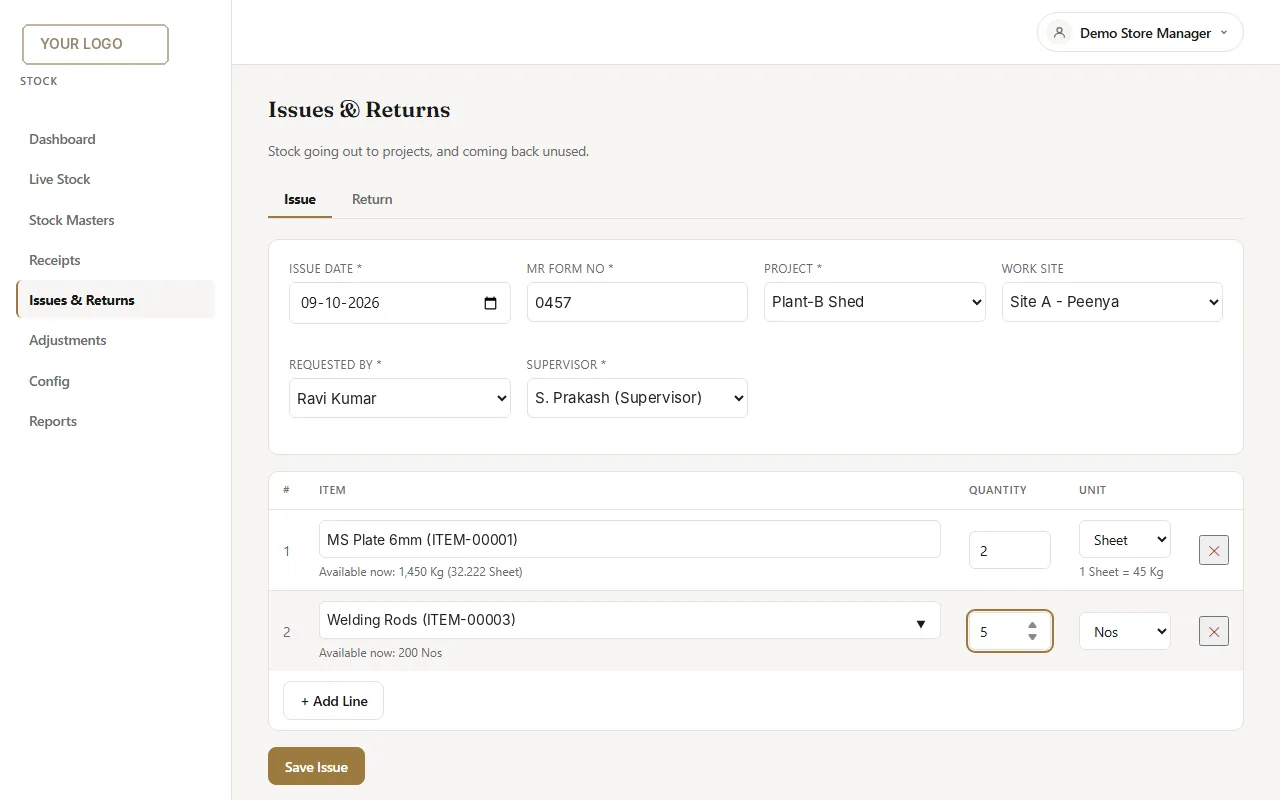
A stock issue screen from an app built to replace a paper register and an Excel sheet. Shown with demo data.
Your options: stay on Excel, buy software, or build your own
Stay on Excel
Off-the-shelf software
Your own custom app
Cost shape
Free, but costs staff time
Usually a monthly fee per user
One-time setup plus optional support
Fit to your process
Fits, because you built it
You adapt to the software
Built around your process
Shared by many users
Poor
Good
Good
Control of your data
In files you own
On the vendor's servers
On a server you control
Best when
One user, low stakes
Your process is standard
Your process is specific, or per-user fees add up
Off-the-shelf software is a sensible choice when your process is close to the standard one. A custom app earns its place when your sheets reflect how you actually work, such as your own approval steps, site-wise attendance or project-wise material issue, and you do not want to bend them to fit a product.
How the move works without disrupting the team
A good migration starts small. Pick the single sheet that hurts the most, usually payroll or stock, and move that first. The steps look like this:
Show your sheets
Share the files and walk through how they are used today. The people building the app need to see the real columns, the messy bits and the approvals, not an idealised version.
See a working demo
Look at a working version built on your data and processes early, and say what is wrong with it while changes are still cheap.
Run in parallel, then switch
Use the old sheet and the new app side by side for a cycle, for example one payroll month. When the numbers match, retire the sheet.
Add modules later
Once the first module works, add the next on the same login: attendance, then payroll, then stock, then a CRM for leads.
Questions to ask before you decide
Who owns the system and the data when it is built? Where is the data kept? What happens if the builder is no longer around? Is there a per-user fee that grows as you hire? Can you add modules later? Clear answers to these matter more than any feature list.
We build this for growing businesses: HR and payroll, stock and inventory, CRM and custom workflows, converted from the sheets you already use. You can see real screens and a recent build on the Excel to App page, or send us your sheets for a free walkthrough.
Ready to replace your spreadsheets?
Show us the sheet that hurts most and we will walk you through what an app would look like.
The NAMAH Digital Works team builds custom business apps for growing businesses: HR and payroll, stock and inventory, CRM and workflows, converted from the spreadsheets and paper registers you use today.
Related Articles
October 20267 min read
Stock Register in Excel: 7 Problems and How to Fix Them
Why Excel stock registers go wrong, and what a stock app does about it.
Read More
Service
Excel to App: HR, Payroll & Stock
Your own web app built from the sheets you use today. See real screens and a recent build.